

201C Cool Ivory
Cool undertone
Very fair skin · cool undertone
Find your foundation
See our five shades on the skin, compare your favorites and get help choosing. Start here – even if you don't know your undertone.
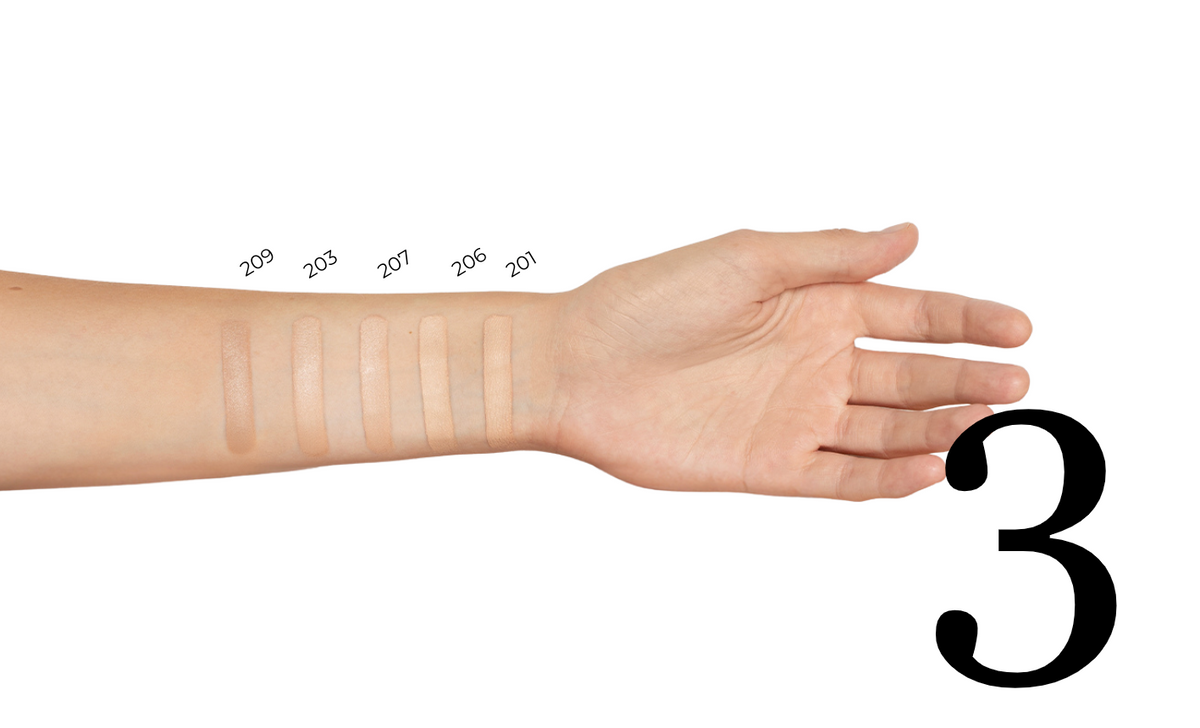
Compare the colors in the same photo.
Examine one or two shades more closely.
Select a product size or get personalized help.
View · compare · choose
First time with LAVINDE? Start with the shades. If you already have a favorite, you can go straight to it.
Same sleeve, five shades. The photo shows the difference between the colors; screen and lighting may affect the appearance.
First, look at how light or dark the color is. Choose one shade that looks relevant, or two you would like to compare.
No shades selected yet.
Start with the depth of the shade. Look for a shade that closely matches your skin at the jawline and neck. Your hand may be a different color than your face.
Next, look at the undertone. C represents our cool shades with more of a pink tint. N represents neutral shades. Having rosy cheeks alone does not tell you what undertone you have.
If you have the product at home: try a thin stroke along the jawline, let it set, and look at the transition to the neck in daylight. The shade that blends in most naturally is a good starting point.
What should you look for? First, compare light and dark on the shared arm photo. Then look at the undertone: C has a cool, pink tint, while N is neutral.
The product images help you recognize the shade. They cannot alone show how it looks on your skin. If you are still unsure, we are happy to help you before purchase.
Choose the code on your current foundation. If your skin has become darker or lighter since last time, you can compare the shades again.
Tell us which shades you are considering. If you already use foundation, please provide the brand, product name, and shade code—and let us know if it looks too light, too dark, too pink, or too yellow on you.
This will give us a better starting point to guide you. If none of our shades seem right for you, please contact us before making a selection.
Cool undertone
Very fair skin · cool undertone
Indicative screen color. Light, the screen, and your own skin affect how the shade appears.
201C Cool Ivory is for very fair skin with cool undertones. It is worth considering if your light foundations often look too yellow or warm on you. C stands for cool; the shade has more of a pink tint.
Pay particular attention to whether the color matches the skin around your jawline and neck. A cool undertone is not the same as rosy cheeks – and the color also needs to be light enough.
If 201C is too light, you can compare it with 206C Ivory, which is also cool. If 201C looks too pink, 203N Sand is a neutral shade to explore. Compare both lightness and undertone.
Natural radiance and medium coverage that you can build up in thin layers. The lightweight, velvety texture creates a more even appearance while still letting the skin look natural.
The formula contains niacinamide, is fragrance-free, and Allergy Certified. If you prefer a completely matte or highly opaque finish in a single layer, it is worth considering.
Your selected shade is available in two sizes. Choose the one that suits your needs.
If you have the product or can try it at a retailer, apply a thin layer along your jawline. Let it set, and assess the transition to your neck in daylight. Ideally, the color should blend naturally without a noticeable light, dark, pink, or yellow edge.
If you are unsure before purchasing, contact us with the shades you are considering, as well as the name and shade code of your current foundation. This helps us provide more specific guidance.
Apply a thin layer to damp skin. Start in the center of the face and blend outwards, ensuring a seamless transition at the jawline and hairline. Only add more where extra coverage is desired.
Start with a thin layer, then gradually build up on areas you want more coverage. Blend the edges. More product provides more coverage—it will not correct a shade that is too light, too dark, or has the wrong undertone.
Neutral undertone
Light skin · neutral undertone
Indicative screen color. Light, the screen, and your own skin affect how the shade appears.
203N Sand is for light skin with neutral undertones. N stands for neutral: the shade is balanced between warm and cool tones. It may be suitable if foundations often look either too pink or too yellow on you.
A neutral shade must still match how light your skin is. Look for a seamless blend between your face and neck rather than only assessing the color on your cheeks.
If you have fair skin and want a cooler color, you can compare it with 206C Ivory. If 203N seems too light, 207N Beige is another neutral shade to consider.
Natural radiance and medium coverage that you can build up in thin layers. The lightweight, velvety texture creates a more even appearance while still letting the skin look natural.
The formula contains niacinamide, is fragrance-free, and Allergy Certified. If you prefer a completely matte or highly opaque finish in a single layer, it is worth considering.
Your selected shade is available in two sizes. Choose the one that suits your needs.
If you have the product or can try it at a retailer, apply a thin layer along your jawline. Let it set, and assess the transition to your neck in daylight. Ideally, the color should blend naturally without a noticeable light, dark, pink, or yellow edge.
If you are unsure before purchasing, contact us with the shades you are considering, as well as the name and shade code of your current foundation. This helps us provide more specific guidance.
Apply a thin layer to damp skin. Start in the center of the face and blend outwards, ensuring a seamless transition at the jawline and hairline. Only add more where extra coverage is desired.
Start with a thin layer, then gradually build up on areas you want more coverage. Blend the edges. More product provides more coverage—it will not correct a shade that is too light, too dark, or has the wrong undertone.
Cool undertone
Light skin · cool undertone
Indicative screen color. Light, the screen, and your own skin affect how the shade appears.
206C Ivory is for light skin with cool undertones. It is worth considering if your foundations often look too warm or yellow on you. C stands for cool and indicates a more pink tone.
Your natural blush on your cheeks does not necessarily have to be the color the foundation matches. Instead, compare it with the skin on your jawline and neck, and also assess whether the shade is light or dark enough.
If 206C seems too dark, you can compare it with 201C Cool Ivory for very fair skin. If you want a neutral shade for fair skin, you can consider 203N Sand. Choose based on both depth of color and undertone.
Natural radiance and medium coverage that you can build up in thin layers. The lightweight, velvety texture creates a more even appearance while still letting the skin look natural.
The formula contains niacinamide, is fragrance-free, and Allergy Certified. If you prefer a completely matte or highly opaque finish in a single layer, it is worth considering.
Your selected shade is available in two sizes. Choose the one that suits your needs.
If you have the product or can try it at a retailer, apply a thin layer along your jawline. Let it set, and assess the transition to your neck in daylight. Ideally, the color should blend naturally without a noticeable light, dark, pink, or yellow edge.
If you are unsure before purchasing, contact us with the shades you are considering, as well as the name and shade code of your current foundation. This helps us provide more specific guidance.
Apply a thin layer to damp skin. Start in the center of the face and blend outwards, ensuring a seamless transition at the jawline and hairline. Only add more where extra coverage is desired.
Start with a thin layer, then gradually build up on areas you want more coverage. Blend the edges. More product provides more coverage—it will not correct a shade that is too light, too dark, or has the wrong undertone.
Neutral undertone
Medium skin · neutral undertone
Indicative screen color. Light, the screen, and your own skin affect how the shade appears.
207N Beige is for medium-light skin with neutral undertones. The shade has a balanced color profile and is worth exploring if you are looking for a beige shade that does not lean distinctly pink or yellow.
Look at your skin as it is now: sun exposure and the season can affect how light or dark the foundation you prefer appears. Pay particular attention to the transition between your jawline and neck.
If 207N seems too dark, you can compare it with 203N Sand for fair skin. If it seems too light, you can try 209N Cool Beige for medium skin. All three are neutral shades.
Natural radiance and medium coverage that you can build up in thin layers. The lightweight, velvety texture creates a more even appearance while still letting the skin look natural.
The formula contains niacinamide, is fragrance-free, and Allergy Certified. If you prefer a completely matte or highly opaque finish in a single layer, it is worth considering.
Your selected shade is available in two sizes. Choose the one that suits your needs.
If you have the product or can try it at a retailer, apply a thin layer along your jawline. Let it set, and assess the transition to your neck in daylight. Ideally, the color should blend naturally without a noticeable light, dark, pink, or yellow edge.
If you are unsure before purchasing, contact us with the shades you are considering, as well as the name and shade code of your current foundation. This helps us provide more specific guidance.
Apply a thin layer to damp skin. Start in the center of the face and blend outwards, ensuring a seamless transition at the jawline and hairline. Only add more where extra coverage is desired.
Start with a thin layer, then gradually build up on areas you want more coverage. Blend the edges. More product provides more coverage—it will not correct a shade that is too light, too dark, or has the wrong undertone.
Neutral undertone
Medium skin · neutral undertone
Indicative screen color. Light, the screen, and your own skin affect how the shade appears.
209N Cool Beige is for medium skin with neutral undertones. Despite the word Cool in the name, it is categorized as neutral on our color scale. N is therefore the code you should refer to when comparing undertones.
This shade is worth considering if the lighter beige shades look too pale on you. Assess the color at the jawline and neck – even if your face has more color than your neck.
If 209N seems too dark, you can compare it with 207N Beige for medium-light skin. If 209N is still too light, or if the undertone isn't right, we are happy to help you assess the options before purchase.
Natural radiance and medium coverage that you can build up in thin layers. The lightweight, velvety texture creates a more even appearance while still letting the skin look natural.
The formula contains niacinamide, is fragrance-free, and Allergy Certified. If you prefer a completely matte or highly opaque finish in a single layer, it is worth considering.
Your selected shade is available in two sizes. Choose the one that suits your needs.
If you have the product or can try it at a retailer, apply a thin layer along your jawline. Let it set, and assess the transition to your neck in daylight. Ideally, the color should blend naturally without a noticeable light, dark, pink, or yellow edge.
If you are unsure before purchasing, contact us with the shades you are considering, as well as the name and shade code of your current foundation. This helps us provide more specific guidance.
Apply a thin layer to damp skin. Start in the center of the face and blend outwards, ensuring a seamless transition at the jawline and hairline. Only add more where extra coverage is desired.
Start with a thin layer, then gradually build up on areas you want more coverage. Blend the edges. More product provides more coverage—it will not correct a shade that is too light, too dark, or has the wrong undertone.

 BeforeAfter
Before/after shows the finish and coverage on the model. Use the shade photo and the guide above to check the color.
Foundation on real skin
Drag the slider to see the skin before and after foundation. Notice how the skin still has texture while the complexion appears more even.
Start with a thin layer and work from the center of the face outwards.
Build up in thin layers where you want extra coverage.
When you're still unsure
Send us the name and shade code of the foundation you use, and tell us what you would like to change about the shade. Also mention the LAVINDE shades you are considering. You can contact us or find a retailer if you would like to see the products up close.
Contact us before you choose. The closest shade is not necessarily a good match.
The associated travel sizes are displayed in your selected shade with the current price and stock status.
Lighting and screen settings can affect how colors appear. View the product in natural daylight, and if you are unsure, feel free to try the shade on your skin.
If a tester for the selected shade is available, it will be displayed along with the product sizes.


